

Retirement Planning Apps, Ranked Worst To Best

While retirement planning is a crucial component of American life going back decades, there has also been a significant shift in recent years in how people prepare to retire. More than ever, Americans are looking to the internet and mobile apps to assist in future planning.
In 2023, J.D. Power revealed via its U.S. Retirement Plan Digital Experience Study that 47% of respondents rely directly on mobile apps offered by plan providers; this is an increase from 33% in the 2022 study. Even if adapting to these apps comes with a learning curve, J.D. Power found, as shared in the 2025 study release, that six in 10 people will prioritize account and data security over user experience.
Because digital retirement planning apps are a relatively new concept, all things considered, not every option will be stellar. Some will offer excellent options across mobile and desktop while others, if user reviews are to be believed, may crash immediately after you log in. With this in mind, check out our retirement app reviews, ranked from worst to best.
10. Corebridge Financial

According to J.D. Power, the Corebridge Financial mobile app ranked 4th in terms of overall customer satisfaction. However, this might not translate to their retirement planning mobile app, as reviews were among the worst we found. In the Apple Store, the app holds a 2.2 rating; it's a little worse in Google Play, with the Corebridge Financial app holding a 2.0 rating.
To access the Corebridge Financial app, users will first have to enroll and complete registration. Once that happens, you are supposed to be able to log in and begin using the service. What Corebridge promises is the ability to access a personal dashboard where you can check your current balance and adjust your contributions. There's also a "retirement readiness" tool that lets users keep track of their timeline and calculate how close they are to meeting retirement income goals.
As nice as these retirement app perks sound, most users are simply not impressed. A common complaint that we saw in Google Play and Apple Store reviews is that they're not able to log in to access their accounts. Some also claim that a series of updates in their experience made the mobile version of the app largely unusable. Some can log in using their name and password, but aren't able to make other security measures, such as fingerprint scanning, work. Though free to use for Corebridge Financial customers, those seeking the best experience will likely prefer accessing their account on desktop over mobile.
9. Ascensus' ReadySave

Ascensus first announced its retirement planning app, ReadySave, in August 2020. Though the company was already making use of a combination of "digital technology and expert services," this was the year in which they hoped to move their retirement planning engagement to the next level. The app, which is free to download and use, would allow its customers to access various retirement plans on a single dashboard. Through the app, users can adjust their pre-tax deferrals from 0% to 20%. Other benefits include visually-pleasing metrics for tracking current investments and future retirement plan contributions.
Despite these components, many users aren't too thrilled with ReadySave; the retirement planning app currently has a 2.1 rating on Google Play and a 2.7 score in the Apple Store. Reviewers found the mobile software to be largely glitchy and complained that it would sometimes crash. Meanwhile, some complained that ReadySave didn't necessarily show retirement plan information in real-time, making it hard to make changes or decisions in the moment using the most up-to-date and accurate information.
Still, not everyone was totally unhappy with ReadySave. One Google Play reviewer appreciated the new MyForecast option, which helps Ascensus customers know what their retirement account will look like once they're ready to retire. Still, many of the more recent complaints seemed to have emerged on the other side of a series of updates. For now, the retirement app seems to be far more disappointing when weighed against other options.
8. MaxiFi Planner
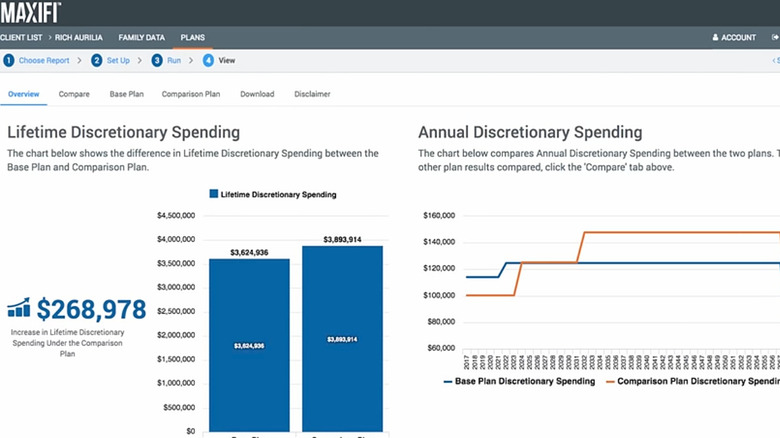
The MaxiFi Planner is what some retirement planners might consider a leap of faith. Unlike some options on this list, MaxiFi does not provide a free tier. Likewise, there is no free trial available. While MaxiFi might have faith in the quality of its digital retirement planning software, not everyone is so casual about spending at least $100 on a service without proof. As one Reddit user put it, "$99 and no free trial? Nope!"
The price of MaxiFi Planner's Standard tier has since increased to $109 per year. At this level, you can keep track of a yearly budget, develop a "tax-efficient" retirement account, and create a series of withdrawal strategies meant to ensure you're able to maintain at least an adequate standard of living post-retirement. Upgrading to the Premium tier costs $149 annually; this subscription offers everything in the Standard plan, but adds things like life insurance contingency planning and a Roth conversion optimizer. Should you pay for MaxiFi's Premium Plus tier, you would then have access to special one-on-one services.
While MaxiFi's service is largely marketed on efficiency and convenience, reportedly running in "deterministic and stochastic modes," each meant to help users make adjustments with financial risks in mind. Even if the software proves itself to be nimble, highly accurate, and a reliable metric for retirement planning, the promise of satisfaction is on the other side of a paywall. For some Americans, ironically enough, this barrier may make MaxiFi not worth the risk of disappointment. If you have the cash to burn, it might be worth testing it out. Otherwise, go for freeware and free trials provided by other retirement planning apps rather than locking yourself into relying on the MaxiFi Planner.
7. Schwab Workplace Retirement
Though Charles Schwab has a general mobile app that helps with financial planning, the company released the Workplace Retirement app to assist customers in focusing specifically on their retirement accounts. When Schwab customers access their account dashboards, they are typically greeted with retirement progress metrics that break down various account contributions, both before and after taxes.
Charles Schwab's Workplace Retirement app, which is free to download, utilizes multiple authorization tools to ensure a secure login. However, user experience seems to be a mixed bag depending on the platform. As of this article, the Schwab retirement planning app enjoys a stellar 4.8 rating with Apple reviewers. Android users seem far less enthusiastic; the app's Google Play store rating currently sits at 2.6.
The discrepancy largely comes down to user experience. With the Android version, many users have complained of difficulty with accessing and using the app. While some mentioned log in issues, others felt that the app itself wasn't user-friendly and that the interface was relatively outdated compared to rival options. Meanwhile, the Apple store reviews, while mostly positive, tend to be older. Some of the newer Apple Store reviews complain of user experience issues similar to their Android-using counterparts. And, once again, it seems the best version of Schwab's retirement planning software is accessible through the website rather than any mobile app.
6. Vanguard Income Retirement Calculator

Vanguard's online software made a positive impression on some reviewers and customers due to being easy to access and use. The Vanguard Retirement Income Calculator is fairly straightforward, and operates on a kind of "if this, then that" series of assumptions based on factors like your current age, income, and amount of savings.
Vanguard provides a transparent outlook for those curious about how it gets its results, explaining that it focuses on social security, pensions, and retirement savings as well as ongoing inflation to get the most accurate future outlook. One potential weakness is that the calculator imagines that inflation will grow at a steady and predictable rate and doesn't factor in sudden economic changes that could wipe out someone's savings.
The income calculator is free to use and you do not need a Vanguard account to save your results for future planning; the company does request your email, usually to make it easier to save and access results. Aside from the calculator, Vanguard has multiple online retirement tools, including retirement expenses and income worksheets as well as an IRA contribution calculator. If you are looking for an easy-to-use, no-nonsense approach to retirement planning, Vanguard's income retirement calculator could work for you. The only downside is that there doesn't seem to be a dedicated mobile version of these apps; you'll need to access them through the website. Still it may be worth it as Vanguard's more general mobile app has mixed reviews among users.
5. Betterment
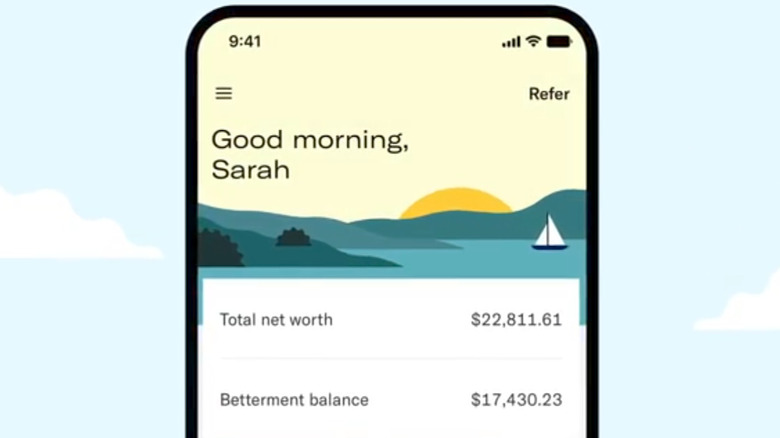
Betterment is one of the most positively rated retirement apps available, earning a 4.5 in the Google Play store and 4.8 in the Apple store. The mobile app is a bit more generalized than other options which specifically focus on retirement planning. However, some users think Betterment is still worth it, as it lets them handle retirement accounts alongside investment and savings accounts, all manageable from a single personalized dashboard.
While a few users encountered issues with transferring funds or adding loved ones to accounts, the Betterment app overall described as easy to use. Others note that when issues did arise, they were able to immediately engage customer service representatives to fix the issue.
Separate from the app, Betterment has experienced some ongoing controversy tied to a January 2026 data leak, when hackers reportedly gained access to customer data through a social engineering attack. Betterment didn't pay the hackers, they ultimately leaked information to the web that included not just a login and passwords, but private financial information. Some estimate that upward of 1.4 million people were affected. Though this has no bearing on Betterment's app, which many objectively believe to be a decent choice for finance and retirement planning, if security is a concern, this recent controversy may be something to keep in mind when weighing which retirement planning app to rely on.
4. RetirePlan

The RetirePlan app is a premium retirement planning tool that makes assumptions about your future finances using metrics such as your current age, income, and available assets. While there is some similarity between RetirePlan and the free Vanguard retirement calculator, Vanguard's online form is a bit more rudimentary. RetirePlan, for example, lets you adjust future wealth outcomes based on scenarios ranging from deciding to buy a new car to experiencing a stock market crash.
The ability to engage in retirement planning with both the extreme and mundane in mind is ideal for Americans that wish to leave no stone unturned when tracking their assets and retirement outlook. While you will need to pay to use RetirePlan, it only costs $2.99 to purchase in the Google Play store; Apple users, however, have to pay $4.99. While there aren't any public user reviews available through Google, we noted that the apparently has a 4.3 rating in the Apple Store.
Reviewers are mostly appreciative of RetirePlan's app, but some have complained of issues such as being forced to distribute non-tax-deferred investments down to zero in order to distribute investments from tax-deferred IRAs and 401(k)s. One user had concerns about the app interface and functions, but later communicated that they heard directly from the developer and were pleased with the transparency and communication. All things considered, users do seem to find the planner fast and easy to use and consider it a good purchase.
3. Boldin (formerly NewRetirement)
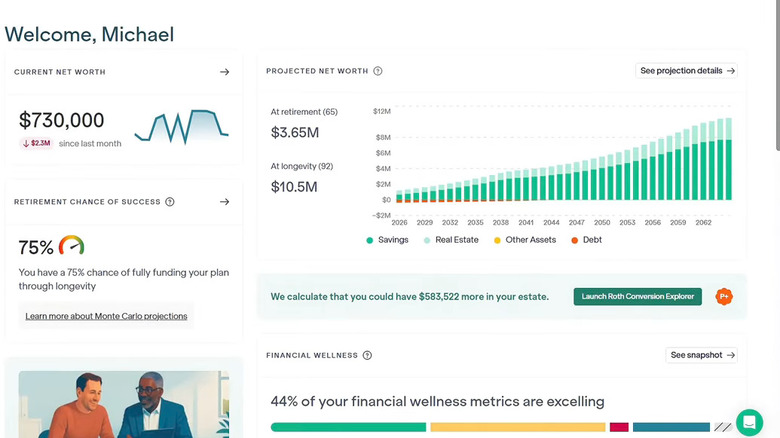
Boldin's retirement planning software is designed to be easy to use, with different planning strategies to track success, such as the Monte Carlo analysis and its Chance of Success score. You can access the most basic tools for free, provided to you sign up to create a free account and answer a few questions about your financial goals. The basic calculator shares how much you should earn by retirement, assuming an annual income growth of 3%. Other items factored in include home equity, retirement savings, and any pensions.
While this might be enough for some Americans, others seeking more detailed insights and retirement planning tools could choose to upgrade to the PlannerPlus tier, which provides information on the best withdrawal strategies and lets you model Roth conversion. Upgrading to PlannerPlus costs $144 per year, though Boldin provides a 14-day trial to see if the premium plan is right for you. Boldin also provides an advisor, though this highest tier costs a flat fee of $2800.
Some previous reviewers have Boldin's app high marks for customer service and cost, while also noting it could be easier to use. Meanwhile, some claim that the freeware version of Boldin "scares" users into paying for the paid tier by putting forth retirement savings scenarios that lack the controls that provide less pessimistic outlooks as what are available in the paid version. However, this isn't necessarily the case, as some have noted that the defaults can be corrected. Others note that, though potentially pessimistic, Boldin's conservative outlook might better suit more cautious planners who are fine with just the free version.
2. Empower
Empower's retirement planner is a bit more detail-oriented than other standard retirement calculators. It offers a "test drive" feature that uses scenario modeling to determine what your retirement would look like based on situations such as retiring early or experiencing a dot-com crash type of economic crisis. These scenarios are paired with visual chart data that adjusts to your plans.
While there are no paid tiers associated with the app, and it is free to use, you do have the option to bring on Empower to manage your assets. However, you will need at least $100,000 worth of existing assets to qualify. It's also important to note that while Empowerment offers retirement planning tools, they are part of the app overall rather than a separate creation. Empower's mobile app in general has largely positive reviews, especially on Apple, where its rating is 4.8; the rating is 3.1 on Google Play.
Overall, Empower's wealth management software and retirement planner have earned positive feedback, but there are complaints related to ease of use and the ability to log in. Still, the service is free, and with some tinkering can offer detailed insight into your future financial picture that is rather intensive for being no-cost retirement planning software.
1. MyRetirement by Nationwide
The MyRetirement app by Nationwide is, from what we can find, the best reviewed retirement planning app right now, averaging a 4.8 score on both Google Play and Apple. The app, which is free to download, was created for Nationwide customers to keep track of their employer-sponsored retirement plans. When you download the mobile version of the app, you will need to log in using your Nationwide credentials.
Overall, the interface is visually pleasing while providing a personalized outlook on things like Roth contributions and rate of return year-over-year. One of the most popular additions to the app is the ability to add beneficiaries, allowing you to take direct control not just over your financial future, but how those financial assets will be distributed to loved ones should you pass away.
While a few users have complained of glitches that have made it hard to sign in, many find the Nationwide MyRetirement app to be easy to use. It's possible that Nationwide will make future updates that will help with any potential log in issues. The additional features, such as the beneficiary add-on option, suggest that Nationwide is continuously rolling out unique tools that line up not just with individual retirement planning, but considerations for couples and their other family members.